Navigation Icons: A Versatile Tool for Modern Design Needs
Navigation icons are a fundamental element in modern design, providing a visual and intuitive way to guide users through digital and physical spaces. Whether you're designing a website, a mobile app, or even a printed flyer, these icons play a crucial role in enhancing user experience and making your content more accessible.
What Are Navigation Icons?
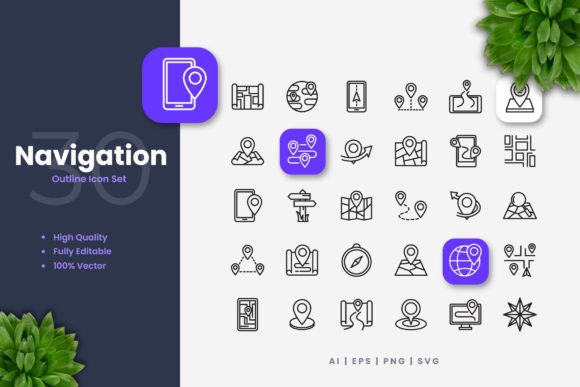
Navigation icons are graphical symbols that help users find their way around a digital or physical interface. They can represent actions, destinations, or categories, and are often used in menus, toolbars, and other navigational elements. These icons are designed to be simple and clean, making them easy to recognize and understand at a glance.
Where and When to Use Navigation Icons
Navigational icons are incredibly versatile and can be used in a wide range of applications. Here are some common scenarios where they shine:
- Websites: Use navigation icons to create a clean and intuitive menu system. This helps visitors quickly find what they need, whether it's the contact page, blog, or product catalog.
- Mobile Apps: In a mobile app, space is at a premium. Navigation icons can help you save space while still providing clear and effective navigation options. Think of the familiar hamburger menu or the back button.
- Social Media: Icons can be used in social media posts, stories, and ads to direct users to specific actions, such as visiting a website, watching a video, or following a profile.
- Infographics: In infographics, navigation icons can help break down complex information into digestible sections. They can also guide the viewer through the flow of the infographic, making it easier to follow.
- Flyers and Print Materials: Even in print, navigation icons can be useful. For example, in a brochure, icons can indicate different sections or provide quick links to additional resources.
Why Use Navigation Icons?
The primary reason to use navigation icons is to improve usability and user experience. Here’s why they are so effective:
- Clarity: Icons are universally recognized and can convey meaning without the need for text. This is especially useful in multilingual or international contexts.
- Consistency: Using a consistent set of navigation icons across your platform helps build familiarity and trust with your audience. Users will know exactly where to go and what to expect.
- Space Efficiency: Icons take up less space than text, which is particularly important in mobile and small-screen designs. This allows for a cleaner, more streamlined interface.
- Aesthetic Appeal: Well-designed icons add a professional and polished look to your project. They can enhance the overall aesthetic and make your design more visually appealing.
Real-World Benefits for Different Users
Navigation icons offer unique benefits to various types of users, from creators and marketers to educators and small business owners. Let’s explore how different users can benefit from them:
For Creators and Designers
Creatives can use navigation icons to streamline their design process. High-quality, customizable icons allow designers to quickly prototype and iterate on their designs. The ability to edit stroke weight, change colors, and resize icons easily in vector software like Adobe Illustrator or CorelDRAW makes it a breeze to adapt icons to any project.
For Marketers and Entrepreneurs
Marketers and entrepreneurs can leverage navigation icons to enhance their digital marketing efforts. By using icons in social media posts, email campaigns, and landing pages, they can create a cohesive and engaging brand presence. Icons can also be used in infographics and presentations to make data and information more compelling and easier to understand.
For Educators and Publishers
Educators and publishers can use navigation icons to create interactive and engaging learning materials. In e-books, course materials, and educational apps, icons can help students navigate through content, highlight key points, and provide interactive elements. This can make the learning experience more enjoyable and effective.
For Small Business Owners
Small business owners can benefit from navigation icons by creating a more professional and user-friendly online presence. Icons can be used on websites, social media, and promotional materials to guide customers to important information, such as contact details, product pages, and special offers. This can help increase engagement and drive sales.
What to Consider Before Using Navigation Icons
While navigation icons are incredibly useful, there are a few things to consider before incorporating them into your projects:
- Consistency: Ensure that the icons you choose are consistent in style and design. This helps maintain a cohesive and professional look across all your materials.
- Usability: Make sure the icons you use are easily recognizable and intuitive. Avoid using overly complex or abstract icons that may confuse users.
- Accessibility: Consider the accessibility of your icons. Use high-contrast colors and provide alternative text (alt text) for screen readers to ensure that all users can benefit from your design.
- Customization: Choose icons that are fully customizable. This allows you to tailor the icons to your specific needs, whether it’s changing colors, adjusting sizes, or modifying the stroke weight.
- File Formats: Ensure that the icons come in a variety of file formats, such as AI, EPS, SVG, and PNG. This provides flexibility for different uses, from web design to print materials.
Conclusion
Navigational icons are a powerful tool for enhancing the usability and aesthetic appeal of your designs. Whether you’re a creator, marketer, educator, or small business owner, these icons can help you create a more intuitive and engaging user experience. By considering factors like consistency, usability, and accessibility, you can make the most of navigation icons and achieve your design goals effectively.